Api & Tokens
Datamanager is equipped with a data access system with JSON API and protected by unique Tokes. You can create your token within Townet Services, logging in with your Datamanager credentials.
We recommend you review the new API requirements in the full documentation and here.
It is possible to manage an unlimited number of tokens with the following parameters:
| Value | Description |
|---|---|
| Token | Alphanumeric string of 64 carachters |
| Expire | Token expiration date. |
| Bind | Use this field if you want to block access to the token from a specific ip, leave it blank if you want to leave access open from anywhere. |
API Reference
Legacy API
Access to the API is available at the following endpoint and is available in the GET and POST methods:
https://apidatamanager.mywaver.it/user/[token]/
New API
Access to the API is available at the following endpoint and is available in the GET and POST methods, with "townet-api-token" header field:
https://apidatamanager.townet.it/api/v1/customer/[args]
The endpoint will return structured data in JSON. Typical example of response structure:
{
    "valid"    :true,
    "contents"  :[{......}],
    "message"   :""
}
| Value | Description |
|---|---|
| result | It can be true/false based on the result of the operation |
| contents | Contains array with response data |
| message | Contains reply message, particularly useful in case of negative answer to understand the nature of the error |
Legacy
Account Info
https://apidatamanager.mywaver.it/api/[token]/info
Returns basic information about your account
Devices List
https://apidatamanager.mywaver.it/api/[token]/devices
Returns the list of your smartbox devices
last device data
https://apidatamanager.mywaver.it/api/[token]/device/[DeviceID]/all
Returns the list of all recently received data
Device Data
https://apidatamanager.mywaver.it/api/[token]/device/[DeviceID]
Returns an object with the time and value sent by the smartbox over time
Post parameters
{
    "type": "See the entire list in the variables section of the guide",
    "time": "See the table below"
}
| Name | Description |
|---|---|
| 6h | 6 Hours |
| 1d | 24 Hours |
| 1w | 7 Days |
| 1mo | 30 Days |
| 2mo | 60 Days |
| 3mo | 90 Days |
| 1y | 1 Year |
New
We recommend you review the new API requirements in the full documentation.
Account Info
https://apidatamanager.townet.it/api/v1/customer/info
Returns basic information about your account
Devices List
https://apidatamanager.townet.it/api/v1/customer/devices
Returns the list of your smartbox devices
Last device data
https://apidatamanager.townet.it/api/v1/customer/device/[device_id]/all
Returns the list of all recently received data
Device Data
https://apidatamanager.townet.it/api/v1/customer/device/[device_id]
Returns an object with the time and value sent by the smartbox over time
Post parameters
{
    "type": "See the entire list in the variables section of the guide",
    "time": "See the table below"
}
| Name | Description |
|---|---|
| 6h | 6 Hours |
| 1d | 24 Hours |
| 1w | 7 Days |
| 1mo | 30 Days |
| 2mo | 60 Days |
| 3mo | 90 Days |
| 1y | 1 Year |
Send Data to Datamanager
https://apidatamanager.townet.it/api/v1/customer/mqtt/send
Post parameters
{
    "device_id": "deviceid",
    "response_topic": "yournewtopic",
    "value": "123",
    "topic": "yournewtopic"
}
To display the new variable within Datamanager, configure the parameter in the Smartbox Edit page by selecting one of the mapping names custom_field_data_* .
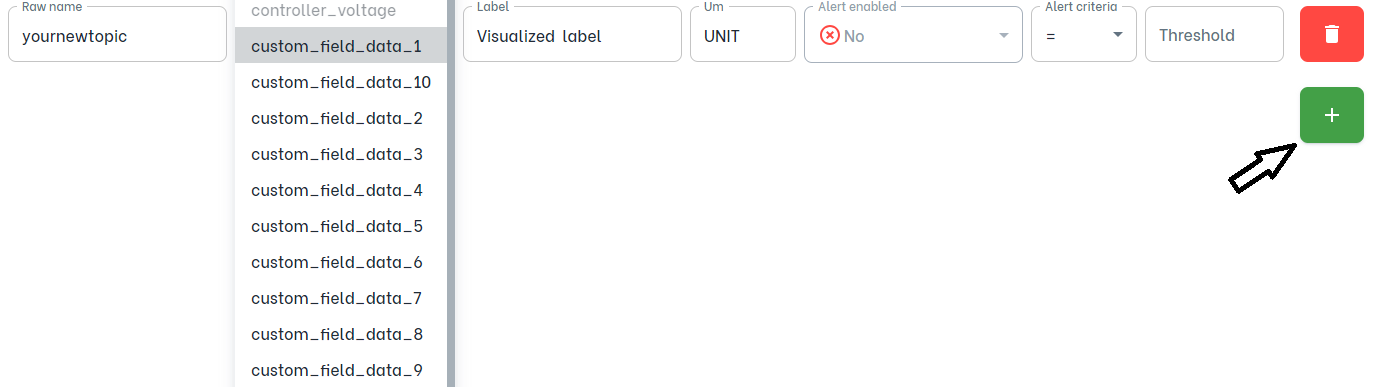
It will appear inside the table after 5 minutes

We recommend sending data every 5 minutes to align it with the rest of the variables.
Sending too many requests will be blocked.